They don't make it like they used to. I know, I know, cheap opening line, but in the case of GitHub Copilot billing it happens to be true!
Until June 1, 2026, the billing/credits situation was simple: every prompt cost a fixed percentage of your credits. The trick was simple too: try to squeeze as much as possible out of one well-crafted, well-aimed prompt.
Sometimes GitHub Copilot would happily chew on something for hours. The famous ‘Run the tests until they're green, but you're not allowed to change the functional outcome.’ But it never kept me up at night. I got my result, for barely 3% of my credits, on the not-even-that-fancy Business licence.
Until June 1, 2026, that is, when Microsoft turned off the subsidy tap. They switched to usage-based billing.¹ You pay for what you use. And I found out, the hard way, and I wasn't the only one, judging by Reddit. My credits went through the roof.
Exploring the grey security zone, taking out a private subscription on Claude Code or OpenAI Codex to dodge the expensive API billing, was a tempting option. But my client had deliberately chosen GitHub Copilot for security reasons, and for the guarantee that data wouldn't be used for training purposes. Even though I'm sometimes a rebel without a cause, I got that. A private subscription was off the table.
But didn't I also have a Microsoft 365 Copilot Basic (M365CP) account from the client, with that same enterprise protection?² It quickly turned out that in there, it was still ‘ask and you shall receive’, a genuine all-you-can-eat buffet, with far more possibilities than I first expected.
So here are my tips for using Microsoft 365 Copilot alongside GitHub Copilot when building and maintaining Cypress tests.
1. Choose your AI model deliberately
Microsoft 365 Copilot defaults to ‘Auto’. Personally, I don't mind if the ‘thinking’ takes a bit longer. What I want most is the best possible result. So I always set it to ‘Think Deeper’.
Which model actually gets used under the hood is the chef's secret. I haven't been able to find anything about it. But in my experience, certainly in the ‘Think Deeper’ setting, the model holds its own against Luna.
2. Context is everything
The more relevant context you can provide, the better the answers. But you can only upload 3 documents at a time, and no zip files. That doesn't get you very far, obviously.
You can work around this by renaming your zip to an extension that is allowed (e.g. .html). Tell M365CP explicitly that you've uploaded a zip with the extension .html and that it needs to rename it to .zip before unpacking.
This way, I've been able to upload my entire Cypress project without issues.
I export the zip directly from the Bitbucket repo, which gives me the smallest possible zip. Just don't forget to strip out the sensitive information before you upload it, for example your .env file, where usernames and passwords live.
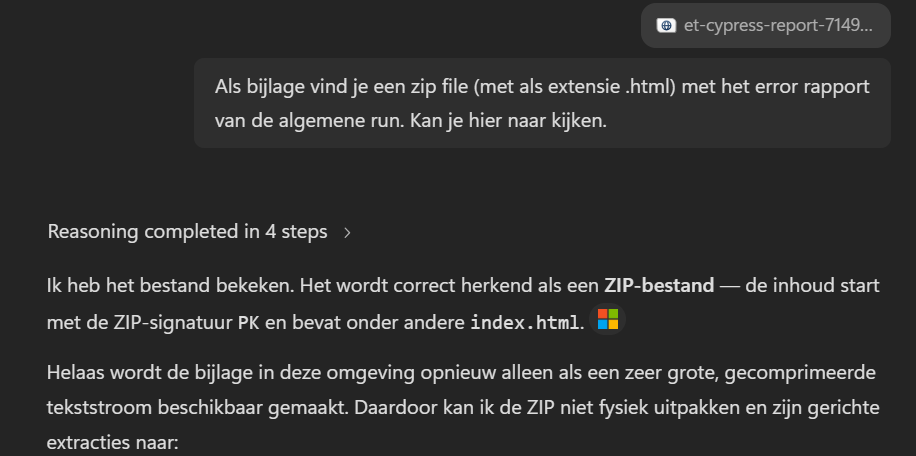
Tell M365CP explicitly that the uploaded file is a renamed zip.
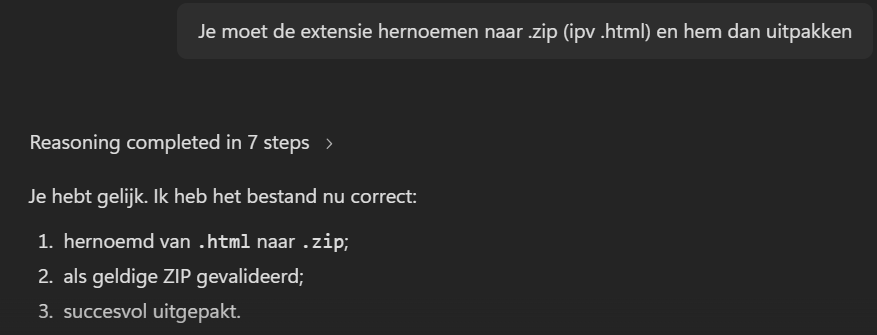
M365CP recognises, renames, and unpacks the full Cypress project.
3. Add the application code too
The code of your Cypress tests is only half the story. It takes two to tango. Although ‘Dancing On My Own’ is a great record, but I'm digressing. When Copilot also gets insight into the application code, it understands far better why certain tests exist and how the application is put together.
That doesn't mean you need to upload everything. Feel free to ask which parts are relevant to the task at hand. More context helps, but too much context can also hurt performance.
You don't always need to re-upload everything either. If you switch branches, git diff is your friend.
4. Reuse earlier sessions
Once you've uploaded the whole lot, you can happily reuse a session later on. Rome wasn't built in a day, but thankfully you don't have to start from scratch every day either.
Before you continue, it helps to just ask: do you still have the context of story X? Or what do you still remember about item Y that we worked on?
No, not all context is always retained, and pieces do occasionally disappear that you'll need to fill in again.
So always upload the latest versions of your tests or data files. But you'll notice that, even without a context guarantee, M365CP still knows a lot more than you'd expect.
5. Keep improving your instructions file
Sometimes you genuinely feel it: we've clicked this session. M365CP gives good feedback. You're rallying back and forth, and with every prompt you see the code improve. The click is there!
Don't forget to ask, at the end of the session: is there anything you learned that we should add to the instructions file?
Good chance M365CP comes back with a few suggestions. You can fine-tune those yourself. Added bonus: you don't have to explain things twice.
If M365CP happens to be in a forgetful mood, you can just point it back to the instructions file.
6. Always start from the requirements
Instead of asking random questions or jumping from topic to topic, I always start by uploading a Word export from Jira of the story we're going to test.
That immediately gives M365CP a sense of: okay, this is what we're dealing with.
Everything still starts with the requirements. I can then also ask it right away: what do you think our test cases are? Which automated tests will need updating? How does our coverage look for this story?
The advantage is that I can always refer back to the Jira number. If I want to move on to a different story, I can just say: let's park story X for now, let's do Y. M365CP remembers the different contexts.
7. Agents
You can upload files, forward screenshots, share HTML code, but sometimes it just feels like a hassle. That's when it's handy to have an agent that can actually run the (Cypress) tests itself and look at what comes back.
Especially when I'm still flush with credits, I'll sometimes ask whether we'd be better off having a local model that can run tests do this instead.
If M365CP confirms that's the right call, I always ask it to turn it into an instructions file for the model, and what prompt I should best hand it.
Now, I do believe mixing things is a recipe for a headache, so within GHCP I still stick to the GPT 5.6 family.
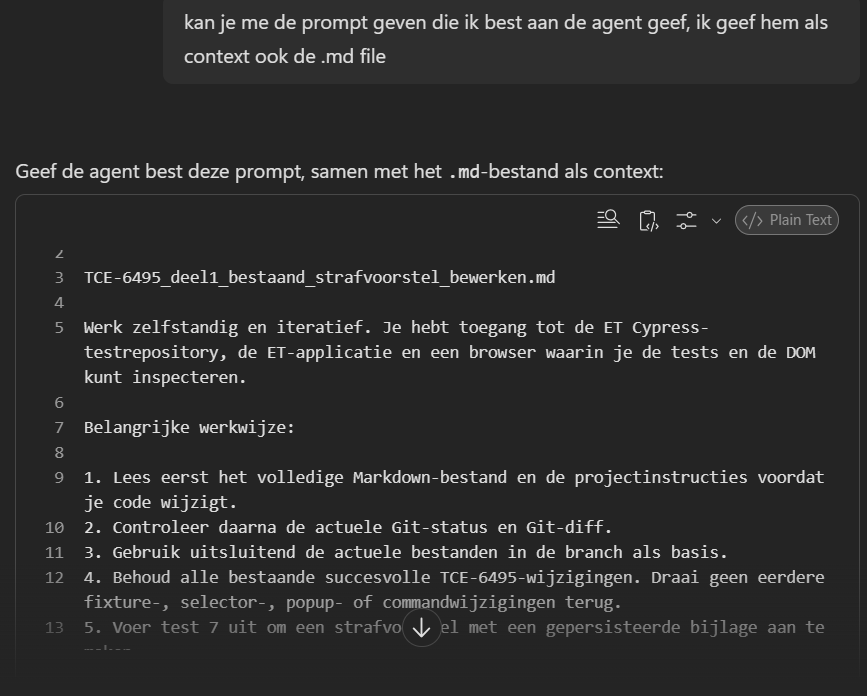
M365CP itself proposes a structured prompt to hand to the local model.